For people with a desk job · no coding
In lesson one you build an assistant for a real task from your own job. 10–15 minute lessons, templates, a mentor who answers privately, and a weekly live Q&A.
$7 today for the course and 7 days of membership, then $39/month. Cancel anytime in one click.
30 · 10–15 min
Video and templates
Within 24 hours
Every Thursday
Claude free · Pro for sections 4–5
Already using Claude or ChatGPT at work?
An assistant, not a chat
A Claude Project with your instructions, files and examples does the same task the same way every week. No re-explaining.
A checking routine
You catch mistakes before your manager does.
Connected to your tools
Email, calendar and spreadsheets: it does the work instead of telling you how.
Claude Code without code
Section 5: sorting files, a small tool for your team, monthly reports. You describe; you check the result.
Not sure where to start?
Accounting · most picked
Month-end checks
Match invoices to POs, flag what's missing, draft the vendor emails. You approve every email before it goes out.
Example run
| Invoice | Vendor | Amount | PO |
|---|---|---|---|
| INV-2045 | Brightline Freight | $1,280.00 | PO-7731 |
| INV-2046 | Kessler Paper | $412.60 | PO-7740 |
| INV-2048 | Harlow Supply | $2,930.00 | Missing |
| INV-2051 | Northgate Tools | $764.25 | PO-7752 |
| INV-2053 | Alder & Finch | $1,105.00 | PO-7758 |
INV-2048 from Harlow Supply has no PO number. The other four match.
Here is a draft to the vendor. I have not sent anything.
Hi,
Invoice INV-2048 for $2,930.00 arrived without a purchase order number. Could you send the PO it belongs to, or a corrected invoice?
We’ll schedule payment as soon as it matches.
Thanks,
Accounts Payable
Hi,
Invoice INV-2048 for $2,930.00 arrived without a purchase order number. Could you send the PO it belongs to, or a corrected invoice?
We’ll schedule payment as soon as it matches.
Thanks,
Accounts Payable
Nothing is sent until you approve.
Sent after your approval. INV-2048 is marked “waiting for PO”.
Weekly AP report
Pull the numbers, write the summary your manager actually reads.
Contract summaries
Key dates, amounts and risks from a 30-page PDF on one page.
Your company data stays private
Nothing from your company is shown in a group or a recording. Mentor reviews are private; live sessions use anonymized examples. Lesson 2.3: what never to paste into AI, and how to use your company's approved account.
Your first week
Day 1
Lesson 1, about an hour including building it. Pick a task, build an assistant.
Day 2
Check its work: a simple routine to trust the output.
Day 3
Send what you built to a mentor, privately. Reply within 24 hours with 3 fixes.
Day 4
Apply the fixes and run it on this week's real work.
Day 5–6
Second task. What never to paste in; company-approved accounts.
Day 7
Measure the hours saved this week.
Thursday
Live Q&A for office roles, 6 pm ET, recorded. Anonymous questions welcome.
After your first week
Week 1 hands off one task. The next four weeks add seven more, with a check on every one.
Week 1 · First task
Days 1–7 · trial
Week 2 · More tasks
Days 8–14
Week 3 · Trust
Days 15–21
Week 4 · System
Days 22–28
Week 5 · Proof
Days 29–35
You finish with
One real task handed off and the hours counted
Open from day 1
The trial week
Day by day in the first-week section above. Everything after it builds on what you make here.
You finish with
A weekly status report built from email, notes and a spreadsheet
Unlocks on day 8
Five lessons, then a build day and a review day
Inbox triage
Meeting notes to action items
Spreadsheets: clean and reconcile
Formulas and pivots in plain English
Rules and examples instead of long prompts
You finish with
A month-end checklist with a human check at each step
Unlocks on day 15
Five lessons, then a build day and a review day
Where the number came from
Catching confident mistakes
What you can and can’t paste
Review checklists
Long documents: contracts, policies, RFPs
You finish with
A vendor follow-up flow, from missing PO to closed record
Unlocks on day 22
Five lessons, then a build day and a review day
Research with sources
Slides and one-pagers
SOPs from how you already work
Chaining tasks into one flow
Shared templates for the team
You finish with
A one-page summary for your manager
Unlocks on day 29
Five lessons, then a build day and a review day
Measuring time saved
Using AI at work when there’s no policy
Showing your manager
Staying sharp: when not to use AI
Your role in two years
By day 37 you have
✓ 8 workflows, each with a review checklist
✓ Hours saved, measured before and after
✓ One page of AI rules for your desk or team
✓ A summary you can show your manager
Built by students

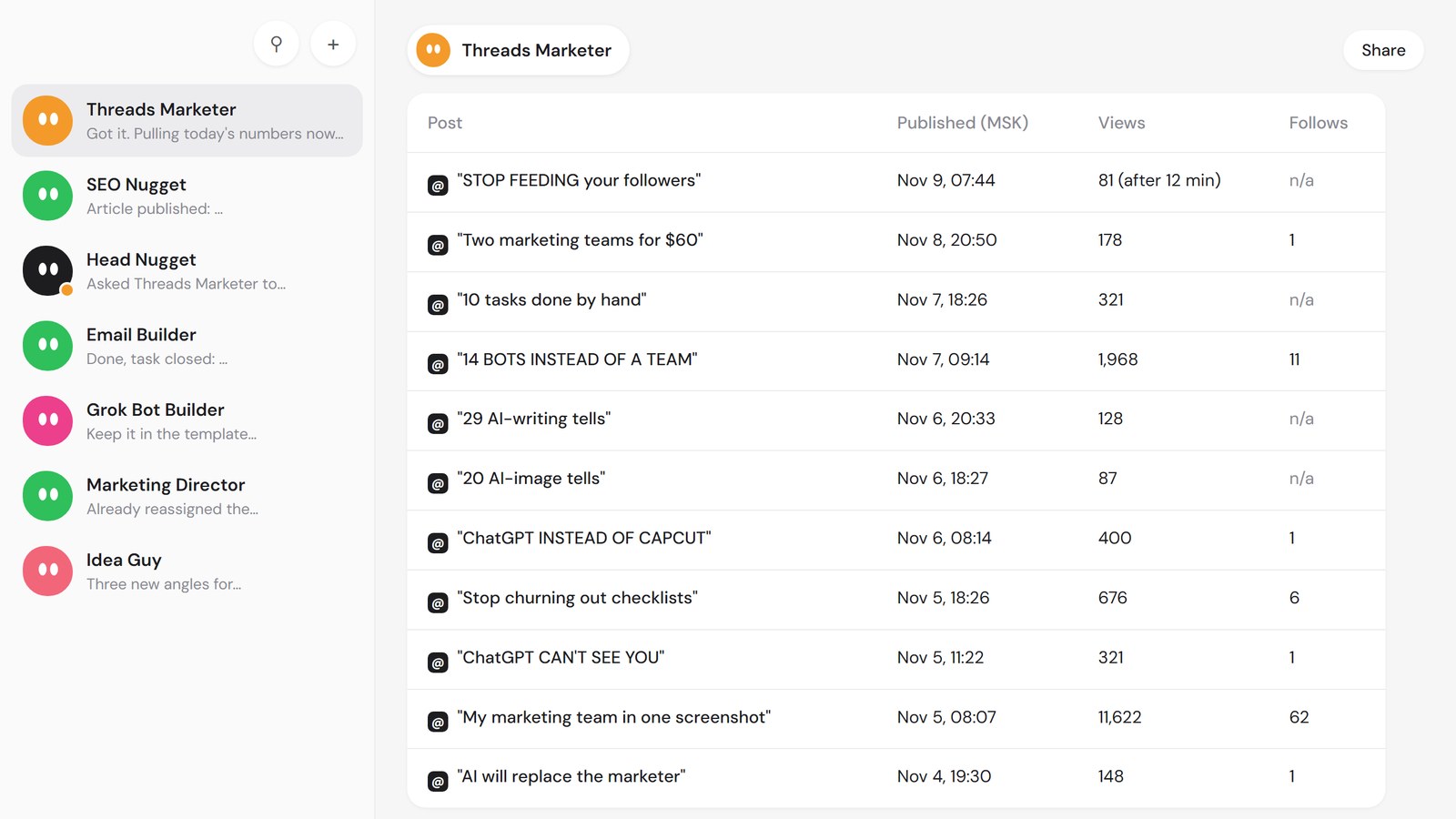
11,622 views
Roman, marketer
His marketing team is a set of AI agents, one per channel, plus a lead agent that hands out tasks. The Threads agent tracks every post and sends him a daily report. 11,622 views is his best post so far.

STUDENTS, WITH NAMES AND MONTHS
Tasha, AP accountant
Month-end reconciliation. Her manager now asks her to show the team.
Dev, HR coordinator
Onboarding emails needed too many edits. He stopped after 2 weeks and moved to interview scheduling.
Ravi, sales ops
The Monday pipeline report builds itself; he checks it.
Grace, construction PM
RFI log and meeting minutes drafted; she reviews them.
What it really costs per month
Course
$39 / month after the $7 first week
Claude, sections 1–3
$0 · free plan
Claude, sections 4–5
$20 / month · Claude Pro
Other tools or API keys
none
Your employer may pay
Many companies already pay for Claude Pro or have an approved account. Lesson 1 includes a one-page request you can send your manager.
Last updated Oct 2026
01
Your first assistant in an hour
02
Trust: checking output, approvals, company data rules
03
Documents and spreadsheets: reconcile, summarize, draft
04
Email, calendar and meetings
05
Claude Code without coding, and a playbook for your team
Why it's a subscription
Tools change monthly. Your lessons change with them.
— Lessons rebuilt within 2 weeks when Claude changes
— New lessons every month
— Weekly live Q&A
— Private mentor reviews within 24 hours
— Your assistants live in your own Claude account

Former operations lead at a 200-person logistics company.
“I'll show the workflows I run every week, and the ones I turned off.”
Mentors: two former accountants and a sales operations manager.
7-day trial
$7 today
Then $39/month from day 8. We email you on day 5 and day 7. Cancel anytime in one click.
30-day money-back on your first paid month. You decide, not us.
What membership includes
✓ All lessons and templates
✓ Private mentor review within 24 hours
✓ Weekly live Q&A
✓ New lessons monthly; rebuilt when tools change
✓ Community
✓ Certificate
I've never coded. Is this for me?
Yes. You never write code.
When will I be charged?
$7 today. $39 on day 8 unless you cancel. Emails on day 5 and day 7.
How do I cancel?
Account → Billing → Cancel. One click, no call, no survey.
What happens after the first week?
Four more weeks, each ending with something finished: more tasks, trust, system, proof. A new week unlocks every 7 days.
What if my company has no AI policy?
Day 30: one page of rules for yourself and your team, and how to raise it with your manager.
Is my company data safe?
Lesson 2.3: what never to paste in, and company-approved accounts. Nothing from your company is shown to other members.
Is this a “make money with AI” course?
No. It's about doing your current work faster.
Support?
support@aicoworker.co. A human replies within 1 business day.
How do I know the numbers are right?
Week 3: every figure points back to its source row, and each workflow gets its own review checklist.
$7 today for the course and 7 days of membership, then $39/month. Cancel anytime.
$7 today for the course and 7 days of membership, then $39/month. Cancel anytime in one click.